

Present email signup invitations and promotional popups during the storefront visit.
View on Shopify App Store ↗What’s New in Smart Pop: Redesigned Popups, Link & Display Fixes, and Vendoria.net Integration
Discover what is new in Smart Pop: modernized layouts across all 4 popup and banner types, fixes for display and CTA link redirect issues, and automatic popup rendering on your store and product pages on Vendoria.net.
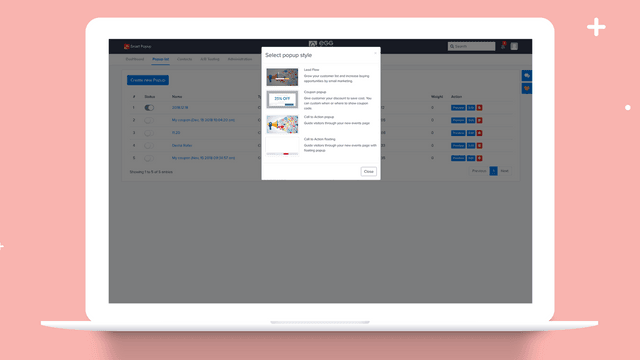
We have rolled out a major update to Smart Pop (Smart Popup) for Shopify merchants. This release introduces a modernized visual design across all four popup and banner formats, fixes link redirect and storefront display issues, and automatically extends your eligible active popups to your store and product pages on Vendoria.net.
Whether you use Smart Pop to capture email leads, distribute discount codes, highlight seasonal promotions, or keep a persistent call-to-action bar at the top or bottom of the screen, these updates ensure your campaigns look sharper and convert more reliably across every touchpoint.
Quick Summary of What Changed
1. Redesigned Popup & Banner Layouts: A cleaner, high-contrast interface across Lead Capture, Coupon Popup, Image/Video CTA, and Floating CTA Bar campaigns, backed by an accurate real-time editor preview and Shopify Online Store 2.0 Theme App Extension support.
2. Display & Link Click Fixes: Resolved relative URL redirect errors (404s) on popup CTA buttons, coupon actions, and thank-you screens so store-relative links resolve accurately against your storefront domain. Improved mobile image behavior, overlay opacity controls (0% to 100%), and long discount code wrapping.
3. Automatic Display on Vendoria.net: Eligible active Smart Pop campaigns now render directly on your brand store page and product detail pages on Vendoria.net, helping you capture leads and share offers with marketplace shoppers.
1. A Modernized Popup Experience Across All Four Campaign Types
Shoppers make split-second decisions when a popup appears. If the layout feels cluttered, text blends into the background image, or the close button is hard to tap on mobile, visitors dismiss the offer before reading it. We redesigned all four Smart Pop campaign types from the ground up to focus on visual hierarchy, readability, and mobile ergonomics:
Lead Capture Popup: Designed to grow your subscriber list without friction. The updated modal pairs a clear headline and value proposition with streamlined input fields for email, name, and phone number, followed by an instant thank-you view with a clickable reward link.
Coupon Popup: Built to reduce cart abandonment and drive immediate checkout action. The coupon box now uses a high-visibility dashed badge with one-click copy functionality, clear copy confirmation feedback, and a direct call-to-action button that takes shoppers straight to your target collection or checkout page.
Image & Video CTA Popup: Ideal for product launches, flash sales, and visual storytelling. You can showcase a hero image or embedded video (YouTube or Vimeo) alongside a bold headline, concise description, and primary action button.
Floating CTA Bar: A non-intrusive sticky bar positioned at the top or bottom of the viewport. We refined the horizontal alignment of the headline, supporting copy, and action button so your announcement remains readable on both desktop monitors and narrow mobile screens.
Just as importantly, we unified the live preview in the Smart Pop dashboard with our storefront rendering engine. What you configure in the editor—from custom colors and typography to background overlay opacity (adjustable from 0% to 100%) and mobile image hiding—matches what your customers see on your live Shopify theme via the Smart Pop Theme App Extension.
2. Fixing Popup Display Glitches and Broken Link Redirects
Merchant feedback highlighted two frustrating issues that could silently hurt conversions: destination links failing when entered as relative paths or domains without a protocol, and visual clipping on smaller viewports. This update addresses both thoroughly.
Smarter URL Resolution for Every Clickable Action
Previously, if a campaign used a relative path (such as /collections/sale or collections/new-arrivals) or omitted https:// in the button URL, clicking the CTA button on a Lead Capture thank-you screen, Coupon popup, Image/Video modal, or Floating CTA Bar could route shoppers to a broken 404 path. Smart Pop now normalizes and resolves all destination URLs directly against your storefront origin:
• Relative store paths like /collections/all or /products/gift-card automatically resolve to your live store domain.
• Bare domains entered without a protocol (such as mystore.com/pages/deals) automatically receive https:// so browsers never treat them as broken relative paths.
• Full external URLs continue to open cleanly in a new tab when configured, preserving the shopper session.
Visual Polish and Responsive Layout Fixes
We also resolved several visual edge cases reported across desktop and mobile devices:
• Background Overlay Contrast: When using full-bleed background images, text could previously become hard to read. The new adjustable dark overlay slider (0% to 100%) guarantees crisp text contrast over any photography.
• Long Coupon Code Wrapping: Long promotional codes no longer overflow or push the copy button off-screen on compact mobile displays.
• Mobile Image Controls: You can now toggle side images off on mobile viewports with a single checkbox, keeping mobile popups compact and compliant with search engine interstitial guidelines.
• Accurate Trigger & Frequency Controls: Exit-intent tracking, scroll-depth triggers, time-delay timers, and per-session display caps work consistently so returning visitors are never spammed after closing or completing a popup.
3. Your Smart Pop Campaigns Now Display on Vendoria.net
Your customers discover your products across more than just your primary storefront URL. With this release, eligible active Smart Pop campaigns now automatically appear on your brand store page and individual product pages on Vendoria.net.
When shoppers browse your catalog or view your product listings on Vendoria.net, your active Smart Pop campaign renders natively using the same modernized layout, brand colors, and targeting logic you configured in Smart Pop:
• Unified Lead Capture: Shoppers who enter their name, email, or phone number on your Vendoria.net store or product page are captured directly into your Smart Pop subscriber list, just as if they signed up on your Shopify storefront.
• Seamless Coupon & Deal Promotion: Visitors exploring your products on Vendoria.net can copy your active discount codes or click your promotional CTAs, which automatically resolve to your store URLs so they can complete their purchase.
• Privacy-First & Non-Intrusive: On Vendoria.net, Smart Pop waits until cookie consent is resolved before scheduling popup triggers and respects session frequency caps so the shopping experience remains smooth and trustworthy.
4. How to Review and Test Your Updated Popups
All display fixes, URL normalization improvements, and Vendoria.net rendering updates are live automatically. To review your campaigns and take advantage of the new design controls:
1. Open Smart Pop from your Shopify Admin Apps menu (or visit the Smart Pop page on Eggflow).
2. Select your active popup or create a new Lead Capture, Coupon, Image/Video CTA, or Floating CTA Bar campaign.
3. Check your Design tab to preview the updated layout, fine-tune your background overlay opacity, and test mobile image visibility.
4. Verify your CTA destination link in the Content tab and ensure the Smart Pop app embed is enabled in your Shopify Theme Editor.
If you have any questions or need help optimizing your popup conversion rate, reach out to our team anytime via Eggflow Support or explore more conversion strategies on the Eggflow Blog.
Apps in this guide
Keep exploring
All stories ↗Eggflow Updates
Critical PHP Vulnerabilities: Eggflow Has Deployed the Fixes
Eggflow patched its production PHP runtime on 22 October 2026. Learn what CVE-2026-109618 and CVE-2026-109619 mean and what PHP website owners should check.
Eggflow Updates
New on Vendoria: Image Search, Similar Products, and Better Recommendations
Discover how Vendoria’s image search, Find similar products button, and updated recommendations help shoppers explore products and visit your store.

Eggflow Updates
Instant Buy is now AISellor Support Chat
Instant Buy has a new name and a shared support inbox. Explore live chat, keyword-based FAQ replies and human takeover, while keeping Sticky Add to Cart.